
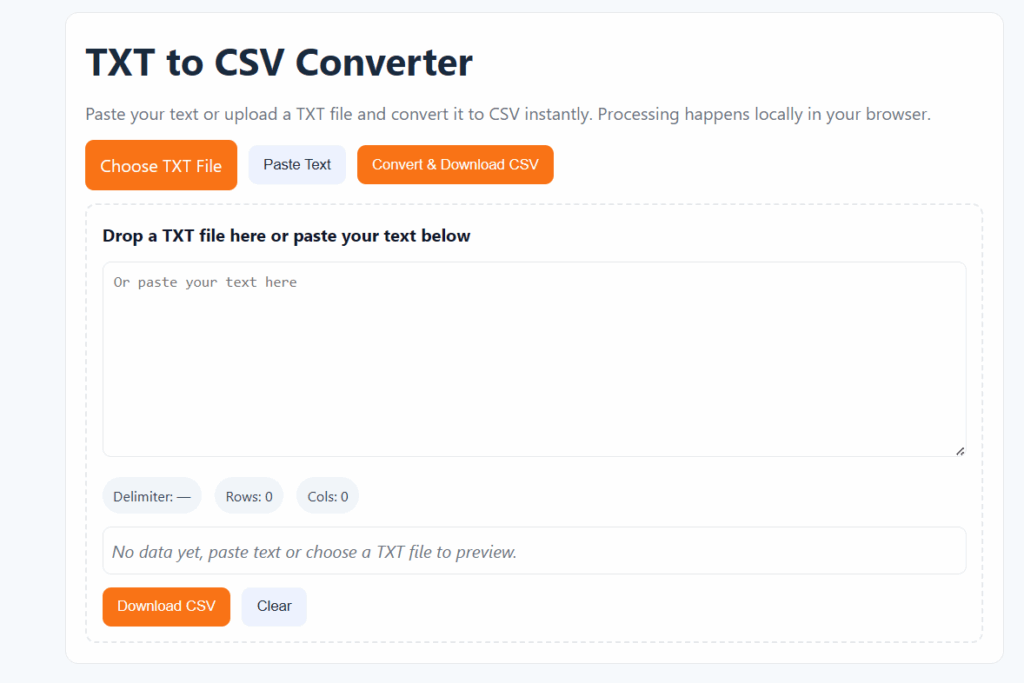
If you often work with text files and need a quick way to convert them into structured spreadsheets, our TXT to CSV Converter is the perfect solution. This free online tool lets you convert any plain text or Notepad file into a CSV format within seconds, without installing any software or worrying about data security.
⚙️ What Is a TXT to CSV Converter?
A TXT to CSV Converter is a simple yet powerful online tool that helps you transform text-based data into CSV (Comma Separated Values) format. Whether you’re dealing with lists, logs, or tab-delimited files, this converter organizes your information into columns and rows, making it ready for use in Excel, Google Sheets, or databases.
Many users create TXT files from Notepad or export data from systems that don’t support CSV by default. Converting them manually can take hours, that’s why an automated TXT to CSV Converter is essential for saving time and improving accuracy.
🧭 How the TXT to CSV Converter Works (Step-by-Step)
Using this converter is quick and effortless. Just follow these simple steps:
Upload your TXT file — Click the “Choose File” button and select your text file.
Automatic processing — The converter detects the delimiters (commas, spaces, or tabs) automatically.
Preview your data — Instantly see how your CSV will look in a clean, tabular format.
Download CSV file — Click “Download” to save your formatted CSV file in seconds.
That’s all — no technical setup, no Excel formulas, no command-line tools. With our TXT to CSV Converter, anyone can process data quickly and efficiently.
🗂️ Supported File Formats
Our converter supports multiple plain text and structured data formats:
| File Type | Description |
|---|---|
.txt | Standard text files from Notepad or any editor |
.log | Log or report files containing tabular data |
.text | General text-based documents |
.dat | Data files that use plain text structure |
.csv | Comma Separated Values format |
No matter how your file is formatted, comma-separated, tab-separated, or space-separated, this tool accurately converts it into a clean CSV format every time.
🚀 Why Choose Our Free TXT to CSV Converter
Here’s why thousands of users rely on this tool daily:
⚡ 1. Instant File Conversion
No waiting, no queues, just upload and download. The conversion happens instantly in your browser.
🔒 2. 100% Secure & Private
Your files never leave your device. The entire conversion is handled locally for maximum privacy and data safety.
🧠 3. Accurate Output
Get perfectly aligned CSV files that open seamlessly in Excel, Google Sheets, or any database application.
🌐 4. Works on Any Device
Our online TXT to CSV Converter runs smoothly on Windows, Mac, Android, and iOS devices.
💰 5. Completely Free
There’s no registration, no hidden fees, and no limits, you can use the tool as much as you need.
❓ Frequently Asked Questions (FAQs)
Q1. Can I convert a Notepad file to CSV?
Yes! Notepad files are saved as .txt. Simply upload your file into the converter and download it as .csv.
Q2. Is the TXT to CSV Converter really free?
Absolutely. It’s 100% free for personal and professional use — no sign-ups required.
Q3. Will my data remain private?
Yes. All conversions are processed directly in your browser. We do not store or access your files.
Q4. What if my TXT file uses tabs or spaces?
No problem! The tool automatically detects and converts tab- or space-delimited text into proper CSV format.
Q5. Can I open the converted file in Excel?
Definitely. CSV files open perfectly in Microsoft Excel, Google Sheets, or any data application.
🔗 Related Tools
Try our other free online converters to simplify your workflow:
🌟 Start Using the TXT to CSV Converter Today
Whether you’re handling logs, reports, or data exports, this TXT to CSV Converter is your fast, secure, and easy way to transform text into organized CSV files. Upload your file, click convert, and download instantly, no installations, no delays, and no cost.
Convert your TXT files to CSV format now, free, secure, and lightning-fast!