
If you want search engines to crawl your website properly and index your pages the right way, then using a Robots.txt Tester is one of the most important steps in your SEO workflow. A robots.txt file tells Google, Bing, and other crawlers which pages they are allowed to access and which ones they should avoid. But if even a small mistake exists inside your robots.txt file, it can block the entire website from being indexed, causing ranking drops, traffic loss, and major SEO issues.
That’s where a Robots.txt Tester becomes extremely useful. With this simple but powerful tool, you can check for errors, test crawl rules, validate directives, and ensure your robots.txt file is fully optimized for search engines.
In this blog, we’ll explore what a robots.txt tester is, how it works, why it’s important for SEO, and how you can use it to fix crawl and indexing issues quickly.
What is a Robots.txt Tester?
A Robots.txt Tester is an online tool that allows you to check your robots.txt file for:
Syntax errors
Incorrect directives
Disallowed paths
Missing rules
User-agent issues
Crawl-blocking mistakes
Search engines rely on robots.txt to understand how to crawl your website. If the file has mistakes like incorrect Disallow rules or misplaced characters, Googlebot might skip important pages or even block the entire site from indexing.
A robots.txt tester gives you a safe environment to:
Paste or load your robots.txt
Test if a specific URL is allowed or blocked
Fix errors before search engines crawl your site
Validate the file according to Google standards
This helps you maintain a healthy crawling structure.
Why Robots.txt Testing Is Important for SEO
Your robots.txt file directly impacts how search engines interact with your site. If it contains hidden mistakes, your website can become invisible in Google search results.
Here are some reasons why testing your robots.txt is essential:
1. Prevent Accidental Deindexing
Sometimes developers block the entire site during development using:
If this remains live on your production website, Google will stop indexing everything.
A tester helps catch these issues instantly.
2. Ensure Search Engines Can Crawl Key Pages
Important pages like:
Blog posts
Landing pages
Product pages
Service pages
must be crawlable. Testing ensures no accidental blocking exists.
3. Fix Syntax Errors
Even a missing slash or colon can change how a crawler interprets the rules.
A robots.txt tester identifies these mistakes.
4. Improve Crawl Budget
Large websites must guide Googlebot properly.
Testing helps optimize crawling paths to save crawl budget.
5. Follow Google’s Latest Standards
The tester ensures your robots.txt follows current best-practices:
Proper directives
User-agent rules
Allow/Disallow structure
Sitemap declaration
This keeps your site search-engine friendly.
How Does a Robots.txt Tester Work?
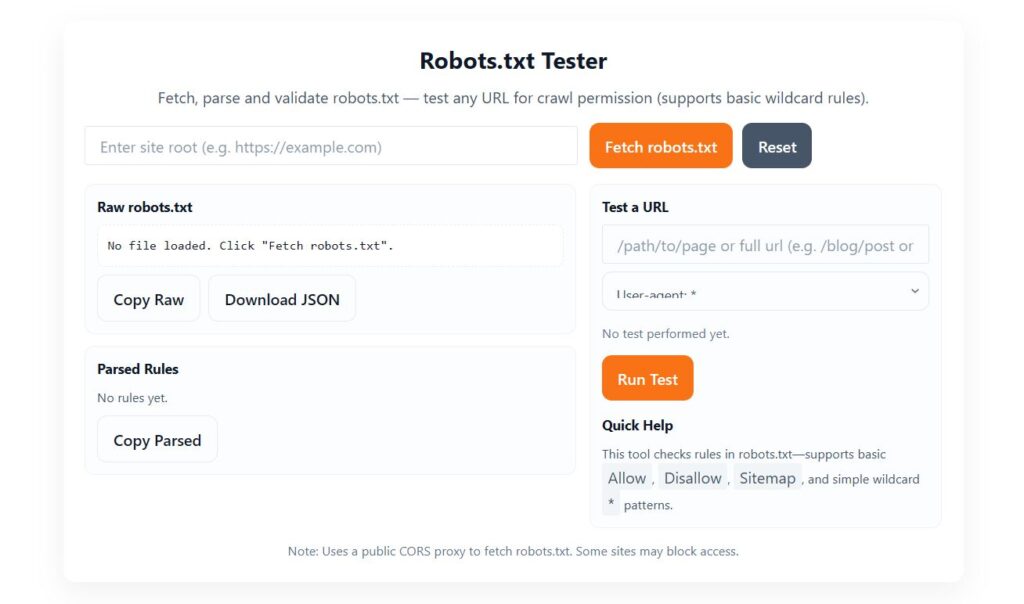
A standard Robots.txt Tester usually includes:
1. Robots.txt Input Box
Paste your robots.txt file or pull it from your domain.
2. URL Testing Field
This allows you to check individual URLs, such as:
Is
/blog/allowed for Googlebot?Can Bingbot crawl
/images/?Is
/admin/correctly blocked?
3. Results & Validation
The tool immediately tells you:
Allowed
Blocked
Warning
Error
4. Error Highlighting
It shows the exact line where the mistake exists.
5. Recommendations
Good testers provide suggestions like:
Add sitemap
Fix missing colon
Avoid blocking essential directories
Use Allow rules correctly
This makes troubleshooting easy even for beginners.
Important Rules to Test in Robots.txt
Here are the most common directives you should validate using a Robots.txt Tester:
User-agent
Defines which crawler the rule is for.
Disallow
Blocks bots from crawling specific paths.
Allow
Overrides a disallow rule.
Sitemap
Always include sitemap URL.
Wildcard Rules
You must test them to avoid unintended blocking.
A tester ensures these work correctly across different crawlers.
Common Robots.txt Mistakes (You Should Test & Fix)
Blocking entire site accidentally
Blocking CSS or JS files
Missing sitemap
Using outdated directives
Incorrect wildcard patterns
Wrong directory paths
Allowing sensitive areas like
/wp-admin/Blocking images that should be indexed
Multiple conflicting rules
Using uppercase where lowercase is required
A Robots.txt Tester catches all of these instantly.
Best Practices for an SEO-Friendly Robots.txt File
To ensure your site is perfectly crawlable, here are recommended rules:
✔ Keep the file clean and minimal
✔ Allow search engines to crawl CSS, JS
✔ Block only sensitive directories
✔ Add sitemap at the bottom
✔ Test new rules before publishing
✔ Avoid long, complicated patterns
✔ Use wildcard rules carefully
✔ Validate using a Robots.txt Tester regularly
These practices improve both crawling efficiency and search visibility.
Who Should Use a Robots.txt Tester?
This tool is ideal for:
SEOs
Bloggers
Web developers
WordPress users
Digital marketers
Website owners
E-commerce stores
Agencies
Anyone troubleshooting indexing issues
It’s a must-have tool for technical SEO.
Related Posts
- Meta Tag Generator Online – Free SEO Tools
- Free Keyword Density Checker Tool
- Sitemap Creator Online | Free XML Sitemap Generator
FAQs for Robots.txt Tester
1. What is a Robots.txt Tester?
A Robots.txt Tester is an online tool that checks and validates your website’s robots.txt file. It helps you find errors, test URLs against crawler rules, and ensure search engine bots can properly access or avoid certain pages.
2. Why is robots.txt important for SEO?
Robots.txt helps control how search engines crawl your website. If the file contains errors, blocked pages, or incorrect rules, it may prevent Googlebot from indexing important content and can negatively affect SEO and rankings.
3. How do I test my robots.txt file online?
Enter your website URL into the Robots.txt Tester, fetch the file, and review the parsed rules. Then, test any URL to see whether it is Allowed or Disallowed for specific user-agents like Googlebot or Bingbot.
4. What types of errors does a Robots.txt Tester detect?
A good robots.txt testing tool detects:
Invalid directives
Misplaced user-agent rules
Incorrect disallow/allow paths
Wildcard misuse
Blocked important pages
Empty or missing robots.txt files
5. Can a robots.txt file block Google from indexing my website?
Yes. If your robots.txt contains Disallow: /, or blocks important pages such as /blog/, /product/, or /wp-content/, Googlebot will not crawl those sections. A tester helps identify accidental blocks.
6. Does robots.txt affect crawling or indexing?
Robots.txt affects crawling, not indexing. A URL blocked in robots.txt may still appear in Google. To prevent indexing, you must use noindex meta tags or HTTP headers، not robots.txt alone.
7. How do I fix robots.txt errors?
You can fix robots.txt errors by:
Removing unnecessary disallow rules
Correcting wildcard patterns
Adding a
Sitemap:URLEnsuring the file is accessible at
/robots.txtUsing the Robots.txt Tester to validate changes
8. What is the correct format of a robots.txt file?
A standard robots.txt looks like this:
Queries, anchors, and blank disallow lines should be handled carefully to avoid crawling issues.
9. Can I test specific URLs against Googlebot?
Yes. Enter any URL in the tester and select “Googlebot” from the dropdown. The tool will show whether that path is Allowed or Disallowed based on the rules in your robots.txt.
10. What happens if my website has no robots.txt?
If no robots.txt file exists, search engines assume all pages are allowed to be crawled. However, creating a basic robots.txt file is recommended for better crawl control and SEO management.
Final Thought
A Robots.txt Tester is one of the simplest yet most powerful tools in your SEO toolkit. It protects your website from crawl errors, prevents accidental blocking, and helps search engines access your important content smoothly.
By testing your robots.txt file regularly, you ensure:
Correct crawling
Proper indexing
Better rankings
Optimized SEO health
If you want search engines to understand your site perfectly, always test your robots.txt before uploading it.