If your website feels slow or takes too long to load, the first place to look is your CSS files. Large stylesheets increase page load time and reduce performance. This is where a powerful CSS Minifier Online Tool becomes essential. With the ability to minify CSS, remove whitespace, compress code, and streamline your style files, this tool ensures faster website loading and better SEO. Whether you’re a web developer, designer, or site owner, using a CSS optimization tool helps you enhance user experience instantly.
If you want to optimize your content properly, start by checking your keyword density using our free tool, it gives you instant results.
In this guide, you’ll learn how this tool works, why it’s important, and how you can use it to improve your website’s speed effortlessly.
Why This Tool Is Useful
A modern website relies heavily on CSS. However, most CSS files contain unnecessary characters such as spaces, line breaks, comments, and formatting. These elements make your code longer but provide no functional value.
A CSS compressor eliminates all redundant parts to reduce CSS size, resulting in cleaner code and significantly faster loading times.
Here’s why you need this tool:
It speeds up website performance.
It reduces bandwidth usage.
It improves mobile loading speeds.
It boosts SEO performance.
It ensures efficient front-end optimization.
Faster websites lead to better user satisfaction, higher search rankings, and improved conversions.
How the Tool Works (Step-by-Step)
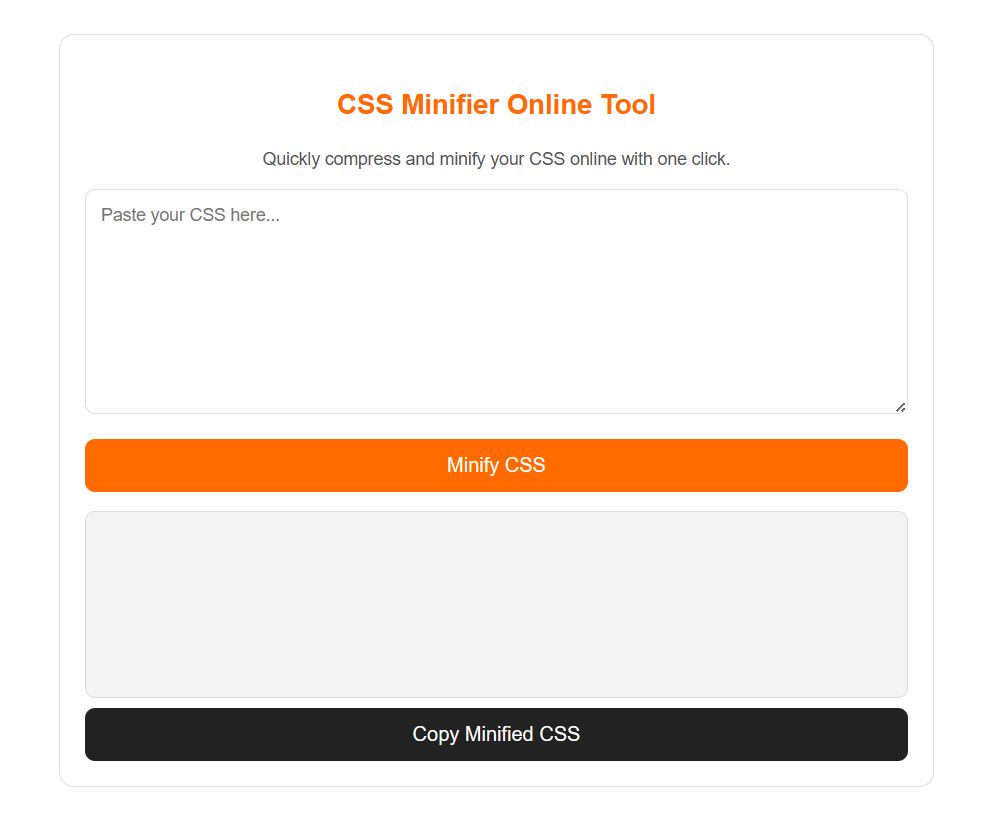
Using a CSS Minifier Online Tool is extremely simple. Follow these steps:
Step 1: Paste Your CSS Code
Copy your stylesheet or CSS lines into the input box. You can paste formatted or unformatted CSS—both work.
Step 2: Click the Minify Button
Once you click the button, the tool begins processing your code using advanced compression logic.
Step 3: Tool Removes Unnecessary Characters
The tool automatically removes:
Whitespace
Line breaks
Indentations
Comments
Extra semicolons
This results in compact, optimized CSS.
Step 4: Get the Minified Output
Your minified CSS generator output appears instantly. You can now copy and paste it into your project.
Step 5: Optional Download
Some tools allow you to download the compressed stylesheet directly.
Features & Benefits
This 100% free CSS Minifier Online Tool includes powerful features such as:
⭐ 1. Instant CSS Compression
Quickly optimize CSS code and reduce file size within seconds.
⭐ 2. Clean & Lightweight Output
The resulting CSS is compact and ideal for production use.
⭐ 3. No Installation Required
This online CSS compression tool works directly in your browser—no plugins or extensions needed.
⭐ 4. Removes Unnecessary Elements
It acts as a CSS code cleaner, removing all elements that do not affect functionality.
⭐ 5. Boosts Website Performance
Smaller CSS files mean faster loading, better user retention, and improved search engine ranking.
⭐ 6. Mobile Optimization
Minified CSS improves performance on slower mobile networks.
⭐ 7. Developer-Friendly
Great for both beginners and advanced developers using a frontend performance tool.
Once your content is ready, make sure to check your broken links so no page authority goes to waste. And if you’re stuck on a headline, use our AI Blog Title Generator, it will do the creative work for you.
Example Use Cases
✔ Web Developers
Developers use a CSS reducer to minimize CSS files before deployment to production environments.
✔ Website Owners
Small business owners wanting to speed up their websites benefit from compact CSS output.
✔ SEO Experts
Since page speed affects search ranking, SEO professionals use this tool to optimize website structure.
✔ Designers
Designers working with large stylesheets use an optimize stylesheet for faster loading approach to enhance performance.
✔ Students & Learners
Students building web projects use this web development utility for cleaner CSS.
Who Should Use This Tool?
The CSS Minifier Online Tool is perfect for:
Front-end developers
WordPress users
Designers
SEO agencies
Bloggers
E-commerce owners
Students learning CSS
If your site uses CSS (which all websites do), you’ll benefit from this free CSS minifier for developers.
SEO-Optimized Headings
What is a CSS Minifier?
Why Should You Compress CSS?
How Does CSS Minification Work?
Tools to Reduce CSS File Size
Best CSS Minifier Tool (Free Online)
How to Minify CSS Online Easily
Price / Free Note
This is a 100% free online tool with no sign-ups, no limits, and no hidden charges. You can use it as much as you want.
Related Posts:
- Free Meta Tag Generator
- Robots.txt Generator
- Free Sitemap Creator
- HTTP Status Checker
- Technical SEO Tools
✅ FAQs
1. What is a CSS minifier?
A CSS minifier is a tool that removes unnecessary characters from CSS to make files smaller and improve performance.
2. How do I minify CSS?
Simply paste your code into the tool, click compress, and the how to minify CSS online process completes instantly.
3. Why should I compress CSS?
Compressing CSS helps reduce load time, improve SEO, and enhance user experience.
4. Is online CSS minification safe?
Yes, it’s safe because the tool processes code directly in your browser.
5. What is the best CSS minifier tool?
A best CSS minifier tool is one that offers fast, safe, and accurate compression without breaking your styles.
6. How does CSS minification work?
Minification removes whitespace, comments, and unnecessary characters to create a tool to reduce CSS file size effectively.
7. Can this optimize stylesheet for faster loading?
Yes, minification directly helps optimize stylesheet for faster loading.
✅ Final Thought
Using a CSS Minifier Online Tool is one of the simplest yet most powerful steps you can take to boost website performance. Whether you’re a beginner or an expert, minifying CSS ensures faster speeds, better SEO, and a smoother experience for every user.
To avoid duplicate content issues and consolidate link equity, don’t forget to use our URL Canonical Checker Tool, it helps you verify canonical tags across your pages.