In today’s fast-paced digital world, images play a crucial role in content, social media, and marketing. However, large image files can slow down websites, affect social media uploads, and make sharing cumbersome. That’s where the Image Resizer Tool comes in. This online image resizer allows you to resize images online quickly and efficiently, without compromising on quality. Whether you need a photo resizer tool for social media posts or to optimize images for your website, this free image tool online has you covered.
Why This Tool is Useful
The Image Resizer Tool is essential for anyone working with digital media. Large images can cause slow page loading, which affects user experience and SEO rankings. With our resize images online functionality, you can adjust your photos to the perfect dimensions while keeping them crisp and clear. It’s a must-have image editing tool for bloggers, marketers, designers, and social media managers who need to prepare images quickly and efficiently.
If you want to optimize your content properly, start by checking your keyword density using our free tool, it gives you instant results.
How the Tool Works (Step-by-Step)
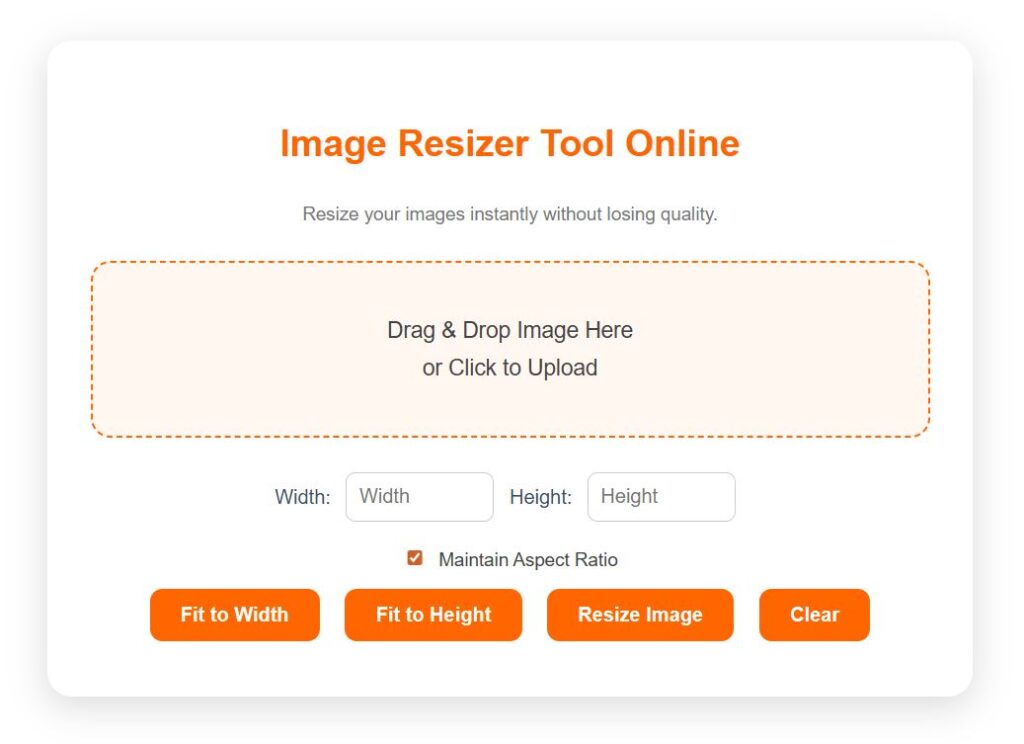
Using our Image Resizer Tool is simple and intuitive:
Upload Your Image – Click the upload button to select your JPEG, PNG, or GIF image.
Select Dimensions – Enter the desired width and height. You can maintain the original aspect ratio if needed.
Choose Batch Resizing (Optional) – Resize multiple images at once with our batch image resizer feature.
Preview the Image – Check how your image looks after resizing.
Download – Save your resized image instantly, ready for social media, websites, or personal use.
This photo resizer tool ensures that your images retain their clarity and are optimized for web use.
Features & Benefits
100% Free Online Tool – No charges or hidden fees.
Supports Multiple Formats – Resize JPEG, PNG, and GIF images effortlessly.
Batch Resizing – Resize multiple images at once to save time.
Maintain Quality – Resize images without losing sharpness or clarity.
Quick & User-Friendly – Simple interface that works instantly in your browser.
No Watermark – Download resized images without any watermark.
Example Use Cases
Social Media Optimization – Resize images to fit Instagram, Facebook, or Twitter posts.
Website Speed Optimization – Reduce image size for faster page loading and better SEO.
Email Campaigns – Resize visuals for newsletters or email campaigns.
Online Stores – Adjust product images for e-commerce platforms.
Personal Projects – Prepare photos for presentations, invitations, or digital scrapbooks.
Once your content is ready, make sure to check your broken links so no page authority goes to waste. And if you’re stuck on a headline, use our AI Blog Title Generator, it will do the creative work for you.
Who Should Use This Tool?
The Image Resizer Tool is perfect for:
Bloggers and content creators who need optimized images.
Social media managers looking to resize images for multiple platforms.
Web developers and designers optimizing website performance.
Businesses and e-commerce platforms that need consistent image dimensions.
Anyone seeking a free image tool online that’s fast and reliable.
Price/Free Note
This Image Resizer Tool is a 100% free online tool. You can resize unlimited images without any restrictions, watermarks, or subscriptions. It’s fast, easy, and accessible from any device with an internet connection.
Related Posts:
- Free Meta Tag Generator
- Robots.txt Generator
- Free Sitemap Creator
- HTTP Status Checker
- Technical SEO Tools
FAQs
Q1: How do I resize an image online for free?
You can resize any JPEG, PNG, or GIF image using our Image Resizer Tool. Simply upload the image, set your desired dimensions, and download the resized file instantly.
Q2: What is the best online image resizer?
Our online image resizer stands out as a free image tool online that maintains quality, supports multiple formats, and even allows batch resizing.
Q3: Can I resize multiple images at once?
Yes! With the batch image resizer feature, you can resize several images simultaneously, saving time and effort.
Q4: How to maintain image quality while resizing?
Our photo resizer tool automatically preserves the original quality while resizing, ensuring no pixelation or blurring.
Q5: Is there a free tool to resize images without watermark?
Absolutely! This Image Resizer Tool is 100% free online and doesn’t add any watermarks to your resized images.
Q6: Can I resize images for social media?
Yes, the tool is perfect for quick image resizer for social media, allowing you to fit images to Instagram, Facebook, Twitter, and more.
Q7: Which image formats are supported?
Our tool supports JPEG, PNG, GIF, and other popular image formats.
Final Thought
The Image Resizer Tool is an indispensable online image resizer for anyone working with digital images. Whether you are resizing photos for social media, websites, or personal projects, this photo resizer tool offers a 100% free online tool solution that is fast, easy, and reliable. Stop worrying about large image files or quality loss, resize your images effortlessly and efficiently today!
To avoid duplicate content issues and consolidate link equity, don’t forget to use our URL Canonical Checker Tool, it helps you verify canonical tags across your pages.