If you work with graphics, digital marketing, UI design, or online content, you already know how important the PNG format is. While SVG is perfect for scalable vector graphics, sometimes you need a raster image for websites, thumbnails, social media, or app previews.
This is where a powerful SVG to PNG Converter Tool becomes essential. With an easy-to-use interface and quick performance, you can convert SVG to PNG in just seconds without losing quality. Many designers, developers, and content creators rely on our online image converter to transform vector files into crisp, pixel-based PNGs suitable for any platform.
If you want to optimize your content properly, start by checking your keyword density using our free tool, it gives you instant results.
Why This Tool Is Useful
The SVG converter plays a vital role for anyone dealing with graphics in different formats. SVG files are great for scalability, but they are not always supported in all applications. PNG, on the other hand, works almost everywhere from blogs to eCommerce platforms to mobile apps.
Here are the main reasons this tool is helpful:
Universal Compatibility: PNG is supported across all browsers, operating systems, and editors.
Quality Retention: This high-quality SVG to PNG converter ensures the PNG output remains sharp.
Fast & Reliable: No installation needed, and the conversion happens instantly.
Perfect for Designers: Easily export icons, logos, and UI elements from vector to raster.
Ideal for Developers: Use the PNG output generator to prepare assets for websites or software.
Whether you need to convert scalable vector graphics to PNG or simply require a one-time conversion, this tool makes the process smooth and professional.
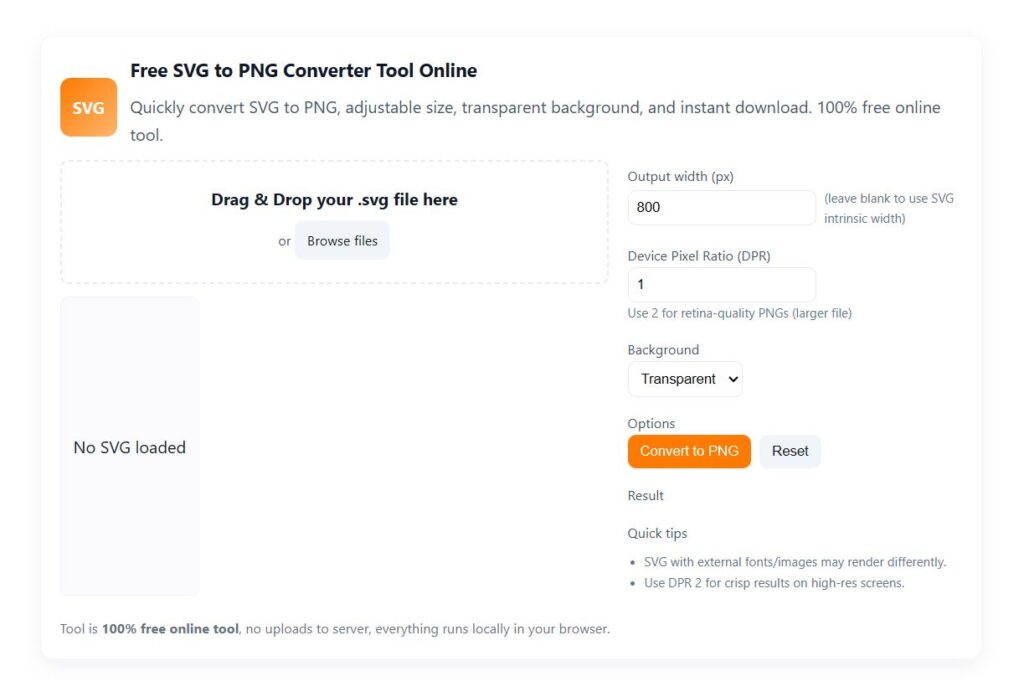
How the Tool Works (Step-by-Step)
Step 1: Upload Your SVG File
Click on the upload button and select your SVG file from your device. The SVG file converter accepts all standard SVG formats.
Step 2: Automatic Processing
The online file converter immediately reads and processes the vector file to ensure it maintains the highest possible resolution.
Step 3: Convert to PNG
Click the convert button to generate your PNG output. The tool performs a fast vector to raster conversion while preserving colors and shapes.
Step 4: Download Your PNG
Once processed, the SVG to PNG Converter Tool generates your PNG file for download. The entire process completes within seconds.
Features & Benefits
1. Simple & User-Friendly
The tool is built with a clean interface so both beginners and professionals can use it instantly.
2. 100% Free Online Tool
No subscription, no hidden fees, this is a free SVG to PNG conversion tool accessible from any device.
3. High-Quality Output
The tool maintains the vector sharpness while converting it into a perfect PNG image.
4. Supports All SVG Files
Whether it’s icons, illustrations, logos, or UI elements, the SVG export to PNG feature supports it all.
5. Fast Processing
This is a lightning-fast image conversion tool that completes conversions in milliseconds.
6. Safe & Secure
No data is stored; everything runs on the client side for maximum privacy.
7. Cross-Platform Compatibility
Works smoothly on Windows, macOS, Android, iOS, and even Chromebook browsers.
Once your content is ready, make sure to check your broken links so no page authority goes to waste. And if you’re stuck on a headline, use our AI Blog Title Generator, it will do the creative work for you.
Example Use Cases
Here are ways users use this SVG to PNG Converter Tool every day:
Web Designers: Prepare logos, icons, and banners in PNG format.
Developers: Convert scalable graphics into PNG files for web assets.
Digital Marketers: Turn SVG visuals into PNG for social media or blog posts.
Students & Teachers: Convert diagrams for assignments or presentations.
E-commerce Owners: Create PNG product icons or badges.
App Developers: Export SVG-based elements into PNG for UI design.
Even if you’re not a design expert, converting with our online image converter is effortless.
Who Should Use This Tool?
This tool is ideal for:
Graphic designers
UI/UX designers
App developers
Web developers
Bloggers & content creators
Students & educators
Brand owners
Anyone who needs quick vector-to-PNG conversions
If you regularly work with graphics, this SVG to PNG utility will quickly become one of your essential tools.
Related Posts:
- Free Meta Tag Generator
- Robots.txt Generator
- Free Sitemap Creator
- HTTP Status Checker
- Technical SEO Tools
Frequently Asked Questions (FAQs)
1. What is an SVG to PNG converter?
An SVG to PNG converter is an image conversion tool that transforms vector-based SVG graphics into PNG raster images.
2. Why convert SVG to PNG?
Many platforms do not support SVG files. Using convert SVG to PNG ensures compatibility across websites, apps, and social platforms.
3. How to use an SVG to PNG converter?
Upload your SVG file, click convert, and download the PNG، it’s that simple with our online file converter.
4. Which tool is the best SVG to PNG converter online?
A best SVG to PNG converter online should provide high-quality output, fast speed, and easy usability، all of which this tool delivers.
5. Is this tool really free?
Yes, it is a 100% free online tool, with no sign-ups or charges.
6. Does PNG maintain the original SVG quality?
Yes, especially when using a high-quality SVG to PNG converter, the image remains sharp and crisp.
7. Can I convert scalable vector graphics to PNG for web use?
Absolutely, this tool is ideal to convert scalable vector graphics to PNG for any digital platform.
Final Thought
The SVG to PNG Converter Tool is the perfect solution for anyone needing fast, accurate, and high-quality SVG file conversions. With powerful features, instant downloads, and the convenience of a 100% free online tool, converting your graphics has never been easier. This tool is a must-have for designers, developers, and digital creators who want professional results every time.
To avoid duplicate content issues and consolidate link equity, don’t forget to use our URL Canonical Checker Tool, it helps you verify canonical tags across your pages.