If you want your website to rank higher and attract more visitors, this free SEO meta tag generator tool helps you instantly create accurate and optimized tags for better visibility. Meta tags tell search engines what your page is about, and this free online tool creates them in seconds.
🚀 What Is a Meta Tag Generator?
A meta tag generator is an online tool that creates SEO-friendly meta titles, descriptions, and keywords for your website pages.
Instead of writing code manually, this tool generates properly formatted HTML snippets you can copy and paste into your site’s <head> section.
Why Meta Tags Matter
Improve your website’s SEO ranking
Increase click-through rate (CTR) in Google results
Help social media platforms display the right page information
🔧 How Does the Free Meta Tag Generator Work?
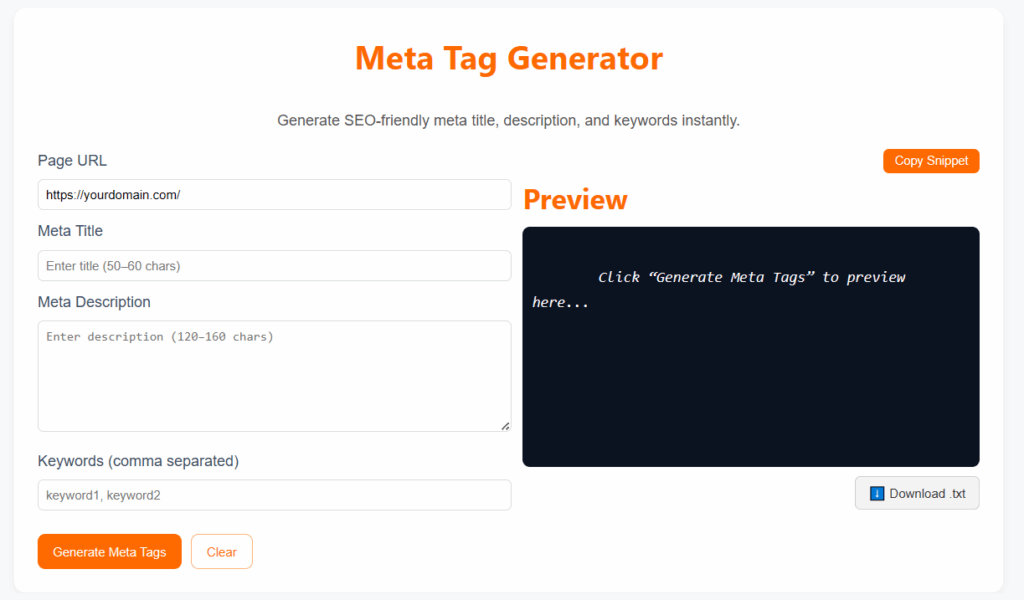
Using this SEO tool is simple:
Enter your website title, description, and focus keywords.
Click “Generate”.
Instantly get ready-to-use HTML meta tags.
Copy the code or preview it next to the box.
This generator is fast, secure, and browser-based, no signup required!
💡 Why Use a Meta Tag Generator?
This free tool is ideal for:
Webmasters, bloggers, and marketers
Anyone improving SEO without coding
Managing multiple pages with consistent metadata
It ensures that all your tags are:
The correct length
Naturally include focus keywords
Search engine–ready
🧠 SEO Benefits of Meta Tags
By using this generator, you can:
✅ Create optimized meta tags instantly
✅ Avoid manual code errors
✅ Improve on-page SEO
✅ Keep metadata consistent site-wide
✅ Get copy-ready code for HTML or WordPress
Clean, accurate meta tags help search engines understand your site, improving overall performance.
🔍 Best Practices for Meta Tags
Keep these guidelines in mind:
Meta titles: under 60 characters
Meta descriptions: 120–160 characters
Use keywords naturally
Avoid stuffing, write for humans
Make descriptions engaging and click-worthy
🚀 Boost Your SEO with Free Meta Tag Generator
Stop writing tags manually!
Use this tool to generate clean, optimized code for every page.
It’s quick, secure, and improves your site’s SEO performance instantly.
🌐 Understanding Meta Tags in SEO
Meta tags are small HTML elements that give search engines and browsers information about your page.
They aren’t visible to visitors but exist inside the <head> section of your website.
Using this generator ensures your meta titles and descriptions follow best SEO practices, improving visibility and CTR.
💡 Example of a Perfect Meta Tag
Example of a professional meta tag generated by this tool:
You can copy and paste this code directly into your WordPress or HTML website.
🧩 Use It for Every Page
Each page needs unique meta tags.
This online tool helps you create custom tags for homepages, blogs, product pages, and landing pages.
Avoid using the same tags across pages, it can confuse search engines.
🛠️ Compatible with WordPress & Blogger
This tool works perfectly with WordPress, Blogger, and all CMS platforms.
Simply copy the generated tags and paste them in your header using Rank Math, Yoast SEO, or your theme editor.
No coding skills required!
❓ FAQs
1. What is a meta tag generator?
It’s a tool that automatically creates SEO meta titles, descriptions, and keywords for your web pages.
2. Why are meta tags important?
They help search engines understand your page content, improving visibility and CTR.
3. Is this tool free?
Yes, completely free and no registration needed.
4. How many tags should I add?
At least a title, description, and keyword tag per page.
5. Do meta tags affect ranking?
Yes, they improve CTR and SEO relevance.
6. Ideal title length?
Around 50–60 characters.
7. How to add tags to my website?
Paste them inside the <head> section of your HTML or WordPress SEO settings.
🔗 Related Tools
📋 Final Thoughts
The Meta Tag Generator is an essential SEO tool for any website owner. It saves time, enhances visibility, and ensures all pages are optimized for Google. Start using it today, and give your website the visibility it deserves.